
Kafka vs RabbitMQ vs SQS: Pick a Message Backbone on Purpose
Backend ·
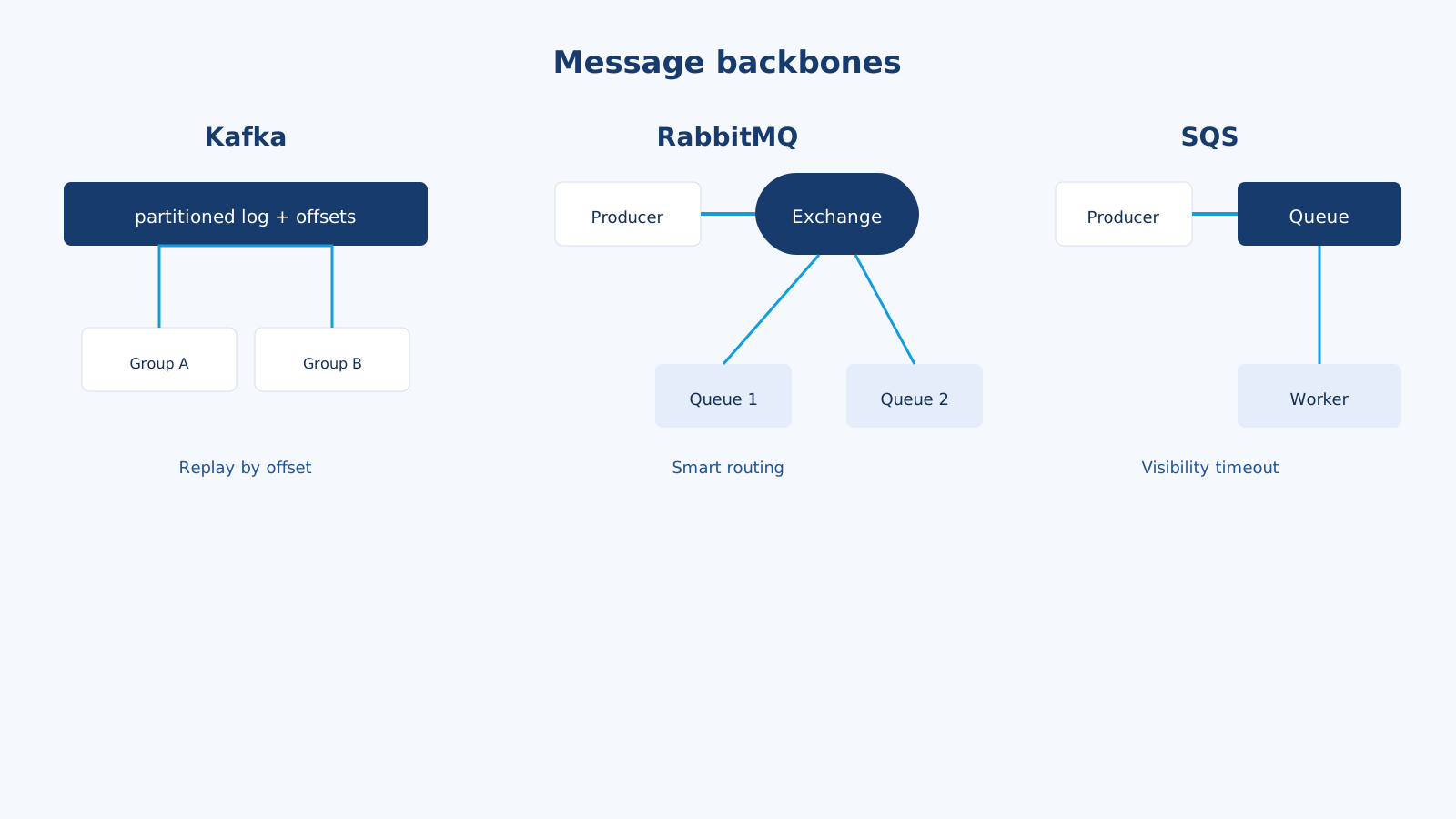
If the job is “do this after the HTTP request,” you need a queue. If the job is “many teams consume the same fact in order, and maybe again next month,” you need a log. Kafka, RabbitMQ, and SQS all move messages. They optimize for different failure modes.
I have used all three shapes: Redis/database queues in Laravel for everyday work, SQS when the app is already on AWS, RabbitMQ when routing rules get interesting, and Kafka when several consumers must replay the same stream. Using Kafka to send a password-reset email is how you buy a cluster you will babysit.
Three mental models
SQS — a managed queue
You SendMessage, a worker ReceiveMessage, then DeleteMessage after success. While the worker is busy, the message is invisible (visibility timeout). If the worker dies, the message reappears. That is at-least-once delivery.
There is no pub/sub in the core product (SNS + SQS is how you fan out). Consumers do not replay history. Once deleted, it is gone.
AWS-native, almost no ops. That is the product.
RabbitMQ — a broker with routing
Producers publish to an exchange. The exchange routes to queues with bindings (direct, topic, fanout, headers). Consumers ack messages. You get dead-letter exchanges, per-queue TTL, priority, and flexible topology.
Rabbit is great at smart routing and work distribution. It is not trying to keep a month of traffic on disk for a new consumer to replay (you can persist, but that is not Kafka).
Kafka — a distributed log
A topic is a partitioned, ordered log. Producers append. Consumers track an offset. They can rewind. Ten services can independently read orders.created at their own speed. Retention is time or size, not “until ack.”
Kafka is a durable stream. Ops cost is real (or you pay for MSK / Confluent). The win is replay, fan-out, and high throughput.
A payment + email + analytics example
User pays. You must:
- Mark the invoice paid (source of truth: Postgres).
- Send a receipt email.
- Tell the CRM.
- Update a warehouse / analytics pipeline.
- Maybe reprocess last week’s events because the warehouse job was wrong.
Write the payment in the same database transaction as an outbox row. Then:
| Work | Tool I reach for |
|---|---|
| Email + CRM, one worker each, no replay | SQS (or Rabbit, or Laravel Redis queue) |
Email goes to mail, CRM to crm, same event copied | SNS -> two SQS queues, or Rabbit fanout |
| Analytics must replay a week after a bug | Kafka topic payments.completed |
| All of it on AWS, two engineers | SQS + SNS. Add MSK later if replay becomes real |
Do not put the invoice update only in a queue. The queue can delay or duplicate. Money lives in the database first.
Comparison
| SQS | RabbitMQ | Kafka | |
|---|---|---|---|
| Abstraction | Queue | Exchange + queue | Append-only log |
| Replay | No (unless you kept a copy) | Not the design | Yes, by offset |
| Ordering | Best-effort; FIFO queues exist | Per-queue, with caveats | Per partition |
| Fan-out | SNS + SQS, or extra copies | Exchanges | Many consumer groups |
| Ops | Near zero | You run it or use a host | Highest (or managed MSK) |
| Throughput | High enough for most apps | High | Extremely high |
| Max message | 256 KB (use S3 pointer) | Configurable, usually small | Larger; still do not dump blobs |
| Delivery | At-least-once | At-least-once (acks) | At-least-once (exactly-once is a special case) |
| Sweet spot | AWS workers, simple async | Routing, RPC-ish tasks, classic apps | Event streaming, audit, many consumers |
Pros and cons
SQS
Pros
- No brokers to patch. IAM, DLQ, encryption, alarms are AWS-normal.
- Visibility timeout + DLQ is an honest retry model.
- FIFO queues give you dedup ids and per-group ordering when you truly need them.
- Cheap at typical web-app volume.
- Pairs with Lambda (
event source mapping) so you may not run a worker fleet.
Cons
- 256 KB limit. You store the PDF in S3 and send the key.
- No replay. If a consumer was down and you already deleted messages, history is gone.
- Fan-out is another service (SNS) or homemade.
- Standard queues can reorder and duplicate. Your handler must be idempotent.
- Long polling and visibility timeouts are easy to mis-tune (worker runs 2 minutes, visibility is 30 seconds, two workers process the same payment).
RabbitMQ
Pros
- Routing keys:
mail.receipt,mail.#,crm.*— topology is a superpower. - Delayed messages, priority, per-queue policies.
- Good for “task queue” culture: workers, retries, DLX.
- Works anywhere: on-prem, Docker, a single VPS next to Laravel.
- Protocols: AMQP, plus MQTT/STOMP if you need them.
Cons
- You own clustering, disk, and memory. A full disk is a production incident.
- Memory alarms when queues back up. Kafka is built to keep data; Rabbit is not a data lake.
- Replay for a new service is awkward. You would have to log elsewhere.
- Classic mirrored queues had footguns; quorum queues are the modern answer — learn them.
- AWS already pushes you toward SQS. Running Rabbit and SQS needs a reason.
Kafka
Pros
- Replay and time travel. Fix a consumer, rewind the offset, rebuild a projection.
- Independent consumer groups. Billing, fraud, and search do not coordinate.
- Huge throughput, sequential disk I/O, partitions for parallelism.
- The log is the integration contract.
orders.v1becomes a company API. - Compaction can keep the latest state per key (
user-preferences).
Cons
- Operational weight: brokers, ZooKeeper/KRaft, disk, rebalances, consumer lag dashboards.
- Partition count is a one-way door in practice. Key design (
orderId) matters on day one. - Ordering is per partition, not global. “Global order” is a lie unless you use one partition (and then you serialized the world).
- Overkill for “send this email.” You will debug
max.poll.intervalinstead of SMTP. - Small teams feel this as cost before they feel the benefit.
Idempotency is not optional
All three will deliver twice.
async function onPaymentCompleted(event) {
  const ok = await db.query(
    'INSERT INTO processed_events (id) VALUES ($1) ON CONFLICT DO NOTHING',
    [event.id]
  );
  if (!ok.rowCount) return;

  await sendReceipt(event.invoiceId);
}
For email, a unique (invoice_id, template) beats hope. For inventory, a conditional update beats a naked stock--.
Exactly-once in Kafka is a producer/consumer/transaction feature for specific pipelines. It does not mean your SMTP provider will not send two messages if you call it twice.
Laravel-shaped examples
// SQS via Laravel
dispatch(new SendReceipt($invoice))->onQueue('mail');
// .env: QUEUE_CONNECTION=sqs
// Rabbit topic (php-amqplib / a Laravel driver)
$channel->basic_publish($msg, 'events', 'payments.completed');
// Kafka producer
await producer.send({
  topic: 'payments.completed',
  messages: [{ key: String(invoice.userId), value: JSON.stringify(event) }],
});
The Kafka key chooses the partition. Same user => same partition => per-user order. Random keys => higher parallelism, weaker order.
Common mistakes
- Putting Kafka in the architecture slide because it photographs well.
- Using SQS standard queues for “exactly once billing” without idempotency keys.
- Visibility timeout shorter than the job. Classic double-charge setup.
- Treating Rabbit as long-term storage. Drain queues; persist in the DB.
- One giant Kafka topic with no schema and no
event_type. Future you will hate present you. - Consuming in the HTTP request. The request publishes; a worker consumes.
How I choose
- AWS, small team, emails, thumbnails, webhooks, CRM sync: SQS. Add SNS when two queues need the same event.
- On-prem or Docker, rich routing, task workers: RabbitMQ.
- Several consumers, replay, analytics, event sourcing-ish projections: Kafka (managed if you can).
- Unsure: start with the queue you already have (Laravel Redis/database or SQS). Promote to Kafka when a second team says “we need last month’s events.”
A queue hides work behind the request. A log is the history of the business. If you do not need history, do not buy a log.