
From a VPS to Real AWS: Route 53, CloudFront, API Gateway, and Compute
AWS ·
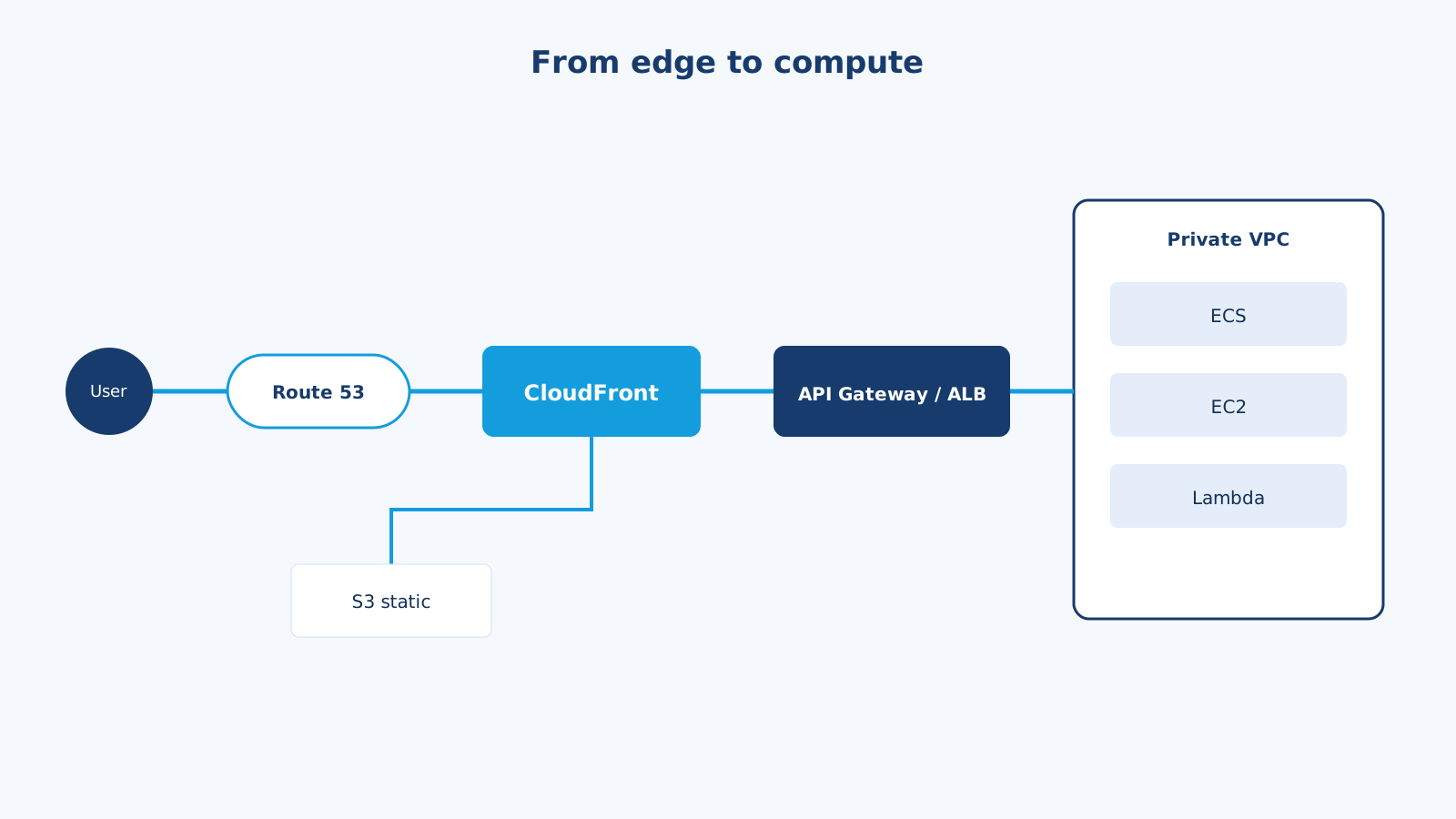
Most sites I ship start on one VM: Nginx, the app, MySQL, maybe Redis. This CV is in that family — Astro builds on GitHub Actions, then a box on DigitalOcean serves static files. That is honest architecture. It is also not the same thing as “we are on AWS.”
AWS becomes worth the ceremony when you need blast-radius isolation, a CDN, managed TLS, independent scale for static vs API vs jobs, and a story for failure. The diagram people draw is:
User -> Route 53 -> CloudFront (CDN)
                      |-- S3        (static / this blog)
                      |-- API Gateway or ALB
                              |-- Lambda
                              |-- ECS (Fargate)
                              |-- EC2
                              '-- SQS -> workers
I will walk that path hop by hop, compare it to “normal hosting,” and mark the hops I skip until a real requirement shows up.
Normal hosting (the VPS)
User -> DNS (A record) -> 203.0.113.10
                            Nginx (TLS)
                              |-- static files
                              '-- PHP-FPM / Node
                                    '-- MySQL on the same disk
Pros
- You can SSH in and see the thing. Debug is
tail -f. - Price is a flat droplet.
- Latency is one hop after DNS.
- Perfect for a CV, a brochure, a small CRM, an early SaaS.
Cons
- TLS, updates, disk, backups, and fail2ban are yours.
- Scale is “bigger box” or “hope the spike is short.”
- One disk dies, site and database die together.
- A deploy that fills the disk takes the blog and the API with it.
- Users in another continent hit your single region every time.
There is nothing shameful here. I still host this way until a constraint forces the next hop.
Full-ish AWS path
1. Route 53 — DNS that can think
Route 53 is DNS plus health checks and traffic policies.
A/AAAAalias to CloudFront (no raw IP to remember)api.example.comalias to an ALB or API Gateway- Failover: primary us-east-1, secondary us-west-2 if you actually have one
- Weighted records for a slow cutover
On a VPS you often have a single A record at the registrar. That works until you want zero-downtime IP changes or latency-based routing. Alias records to AWS targets are the first “this feels like AWS” win.
2. CloudFront — the CDN / edge reverse proxy
This is the hop that changes user experience.
- Static Astro/HTML/JS/CSS from S3 at the edge
- TLS at the edge with ACM
- WAF (AWS WAF) in front of the distribution
- Cache
GETfor public APIs; never cacheSet-CookieHTML by accident - Origin failover: S3 primary, or ALB origin for
/api/*
/           -> S3 (static)
/assets/*   -> S3 (long cache)
/api/*      -> ALB or API Gateway (cache disabled or very short)
Pros: TTFB drops worldwide, origin load drops, you hide S3 and origin IPs, TLS is boring.
Cons: Cache invalidation, cookies vs cache keys, and “why is this old HTML still live?” You will learn Cache-Control.
If the entire product is one API used by a single office, CloudFront can wait. If you have a public site or a mobile app with images, put it in on day one. It is the cheapest “we look professional” hop.
3. Front door for the API: API Gateway or ALB
I wrote a full comparison in API Gateway vs Load Balancer. The short version for this path:
| You have | Front door |
|---|---|
| ECS/EC2 Laravel or Node, first-party clients | ALB |
| Lambdas, partner API keys, usage plans | API Gateway |
| Mix | CloudFront path routing, or Gateway in front of ALB only if you need Gateway features |
Do not do Gateway -> ALB -> one container “because the diagram had both.”
4. Compute: Lambda vs ECS vs EC2
This is where people fight religions. I pick from the process shape.
Lambda
- Code that starts, handles one event, exits
- Webhooks, image resize, PDF, cron, API routes with bursty traffic
- Pay per invocation. Scales to zero.
- Timeouts (minutes, not hours), package size, cold starts, 10s of seconds of CPU for a fat Laravel boot can feel wrong
- Great behind API Gateway or as an SQS consumer
ECS on Fargate
- A container that stays up: Laravel Octane, a queue worker, a WebSocket process
- No EC2 patching. You still design CPU/memory, autoscaling, and health checks
- My default for “this is a real app” on AWS when I do not want to SSH into AMIs
EC2
- When you need a kernel module, a GPU, a license dongle, or you are lifting a pet VM
- Or when cost at huge steady load beats Fargate
- You are back to patching, SSM, and “who owns this box?”
HTTP API, bursty, little state     -> Lambda
HTTP API, always-on, WebSockets    -> ECS
Background workers                 -> ECS service or Lambda on SQS
Legacy PHP on a custom AMI         -> EC2 (then plan the escape)
A WhatsApp bot + admin inbox I would split: API on ECS, webhook receiver can be Lambda (verify, drop on SQS), workers on ECS or Lambda, static admin on S3 + CloudFront.
5. The rest of the private VPC
A “full AWS” drawing that stops at Lambda is a lie. Production also has:
- VPC with public subnets (ALB, NAT) and private subnets (ECS, RDS)
- RDS (MySQL/Postgres) Multi-AZ when the invoice table matters
- ElastiCache Redis for sessions and queues (see sessions vs JWT)
- SQS for async (see Kafka vs RabbitMQ vs SQS)
- ECR for images, GitHub Actions for build, OIDC to IAM instead of long-lived AWS keys
- Secrets Manager or SSM Parameter Store — not
.envon a public AMI - CloudWatch + alarms. If nobody pages, you do not have production, you have hope
Side-by-side
| Concern | VPS / “normal hosting” | Full AWS path |
|---|---|---|
| DNS | Registrar A record | Route 53 alias + health |
| TLS | Certbot on the box | ACM on CloudFront / ALB |
| Static files | Nginx from disk | S3 + CloudFront |
| App | Same box as Nginx | ECS/EC2/Lambda in private subnets |
| Scale | Vertical | Horizontal per service |
| Deploy | git pull && ./deploy.sh | Build image, roll task def / Lambda version |
| Failure | Box down = everything down | AZ, target health, DLQ |
| Cost | Simple | Many small bills; idle NAT is a classic surprise |
| Team size that enjoys it | 1–3 | 2+ who will own IAM and networking |
Pros and cons of jumping to full AWS
Pros
- Static and API scale independently. A traffic spike on the blog does not sit on the same PHP-FPM as checkout.
- You can take an ECS service to zero tasks at night; you cannot take “half a VPS.”
- IAM is a real security boundary if you use it. A leaked S3-only key is not a leaked prod SSH key.
- Multi-AZ RDS is a checkbox you will not implement yourself with a USB disk.
- Same building blocks as every job description: Route 53, CloudFront, ECS, Lambda, SQS.
Cons
- A hello-world now includes VPC, subnets, NAT (
$32/month before traffic), ALB ($16+), and a log group. - Debug is CloudWatch, not
vim. - IAM will block you for a day and that day is still cheaper than an open S3 bucket.
- You can recreate a worse VPS: one EC2, public IP, all ports, MySQL on the instance. That is not “full AWS.” That is a droplet with extra steps.
A deploy I would actually run
For this portfolio + a future API:
Today (fits the repo you are looking at)
GitHub -> Actions -> astro build -> rsync/ssh to VPS -> Nginx
Next step if the API grows (not because AWS is cooler)
GitHub -> Actions
            |-- astro build -> S3 -> CloudFront invalidation
            '-- docker build -> ECR -> ECS deploy
Route 53
   blog.example.com  -> CloudFront -> S3
   api.example.com   -> ALB -> ECS (Laravel)
                              -> SQS -> ECS worker
                         RDS + Redis in private subnets
Serverless variant for webhooks and crons:
api.example.com -> API Gateway -> Lambda (fast handlers)
                               -> SQS -> Lambda (slow handlers)
I would not put the contact form of a CV behind API Gateway + four Lambdas + Step Functions. A serverless contact form is a fine tutorial. It is not automatically better than an HTML form and an email.
Keywords and how they connect
- Origin: who CloudFront talks to (S3, ALB, custom).
- Alias record: Route 53 pointer that tracks a moving AWS target.
- Target group: who the ALB considers healthy.
- Task definition: what ECS runs (image, CPU, env).
- Execution role vs task role: who can pull from ECR vs who can read S3. Do not merge them “to make it work.”
- NAT gateway: how private tasks reach the internet (npm, Stripe). Expensive if you forget it.
- OIDC deploy: GitHub assumes an IAM role. No
AWS_SECRET_ACCESS_KEYin repo secrets if you can avoid it.
Common mistakes
- Public RDS. If the security group allows
0.0.0.0/0:3306, the rest of the diagram is theater. - CloudFront in front of a dynamic admin POST app with a default cache behavior. Users will share sessions in the folklore sense.
- One giant ECS task: nginx + php + queue + cron + mysql sidecar. You rebuilt the VPS.
- Lambda for a 90-second report, then surprise timeout. Use ECS or a job + 202.
- Storing uploads on the container filesystem. Use S3. Fargate disks are not your NAS.
- Skipping WAF and relying on “security through a hidden URL.”
How I choose
- CV, brochure, low-write blog: static host or one VPS. This site can stay here a long time.
- Need global static + one API: CloudFront + S3 + ALB/ECS. Route 53 as soon as you are tired of A records.
- Need bursty webhooks and little idle cost: API Gateway + Lambda + SQS.
- Need always-on sockets or a fat PHP app: ECS, not Lambda.
- Need “we cannot go down with one disk”: Multi-AZ RDS and at least two tasks in two AZs. That — not the logo salad — is the upgrade.
The mature move is not adding every AWS service. It is naming the hop that removes a risk you actually have. DNS, edge, front door, compute, data. Draw those five. Delete the boxes that do not earn a sentence. That is the architecture I want on a résumé and in production.